- Quick Support Form
- info@flikspace.com
- Live Support Chat
How to delete account on Flik Studio App?
Account Deletion Instructions
We value your privacy and provide a straightforward way to manage your data. If you wish to permanently delete your account and all associated data, please follow the steps below.
Steps to Delete Your Account
- Open the App: Ensure you are logged into the account you wish to delete.
- Navigate to Settings: Tap on your profile icon or the menu button and select Settings.
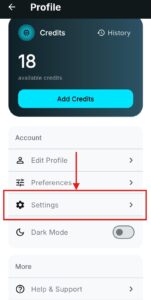
- Initiate Deletion: Scroll to the bottom of the settings menu and tap on Delete Account.

- Confirm Request: A confirmation prompt will appear. Review the implications of account deletion and tap Confirm/Submit.
- Finalization: Once submitted, your account will be permanently deactivated and scheduled for deletion.
Important Information Regarding Data Deletion
Irreversibility: Once the process is complete, your profile, photos, and history will be permanently removed and cannot be recovered.
Data Retention: We retain certain data only where required by law or for legitimate security purposes (e.g., fraud prevention) as outlined in our Privacy Policy.
Support: If you are unable to access your account to perform these steps, please contact our support team at support@flikspace.com with the subject line “Flik Studio Account Deletion Request.”